Dynamic Routing — Conditional Models, Budget Fallback & A/B Testing
Task
Build a dynamic route that routes different users to different AI models, falls back to a cheaper model when a budget is exceeded, and A/B tests new models on a percentage of traffic.
Why
Not every user needs the same model. Premium users may get a larger, more capable model, while free-tier users get a smaller, cost-effective one. When the premium model budget runs out, you want automatic fallback — not errors. And when evaluating a new model, you want to test it on a percentage of traffic before full rollout.
Dynamic routing lets you build all of this in the dashboard — no code changes, instant rollback, versioned history.
What You Are Configuring
- A dynamic route named
smart-routewith three routing patterns:- Conditional routing —
user-admingets the large 70B model, everyone else gets the small 1B model - Budget fallback — the admin's 70B model has a cost cap; when exceeded, traffic falls back to the 1B model silently
- A/B testing — non-admin traffic is split 50/50 between two models
- Conditional routing —
The conditional user_id == "user-admin" is a simplified lab version of what you would build with Cloudflare Access groups. Premium users (identified by JWT claims or Access groups) get routed to the premium model. Budget fallback ensures cost stays controlled even for premium tiers. A/B splits let you test new models on a percentage of traffic before full rollout.
Step 1: Prepare Your Gateway
Before creating the dynamic route, ensure previous controls do not interfere.
- Navigate to AI > AI Gateway > bootcamp-lab > Settings
- If you have any rate limiting or spend limits configured from previous exercises, temporarily disable them or increase the values
- Leave caching enabled or disabled — it will not interfere with routing
You can also leave guardrails and DLP enabled. They apply regardless of which model serves the request — that is the point of gateway-level controls.
Step 2: Create a Dynamic Route
- Navigate to AI > AI Gateway > bootcamp-lab
- Click Dynamic Routes in the left menu
- Sekect Start from scratch
| Field | Value |
|---|---|
| Route name | smart-route |
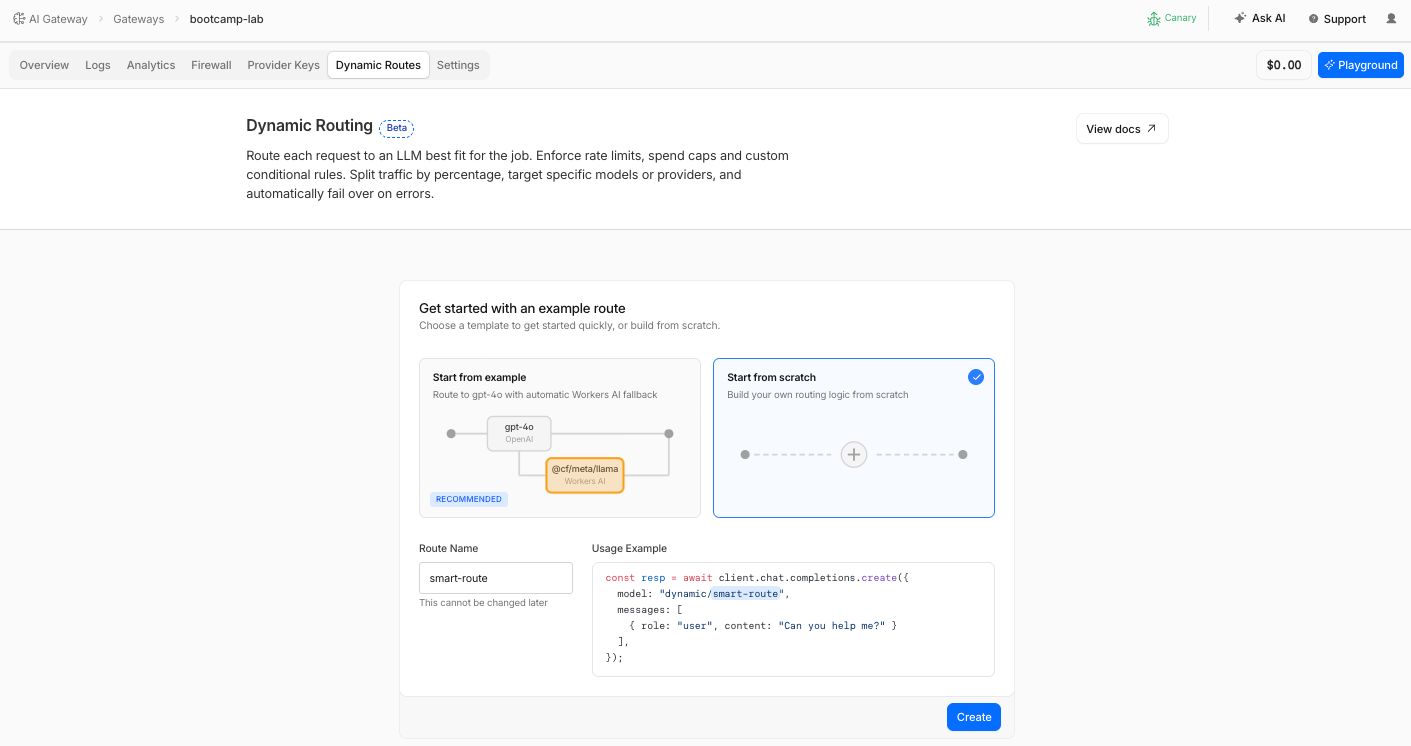
- Click Create
- You are now in the visual flow builder
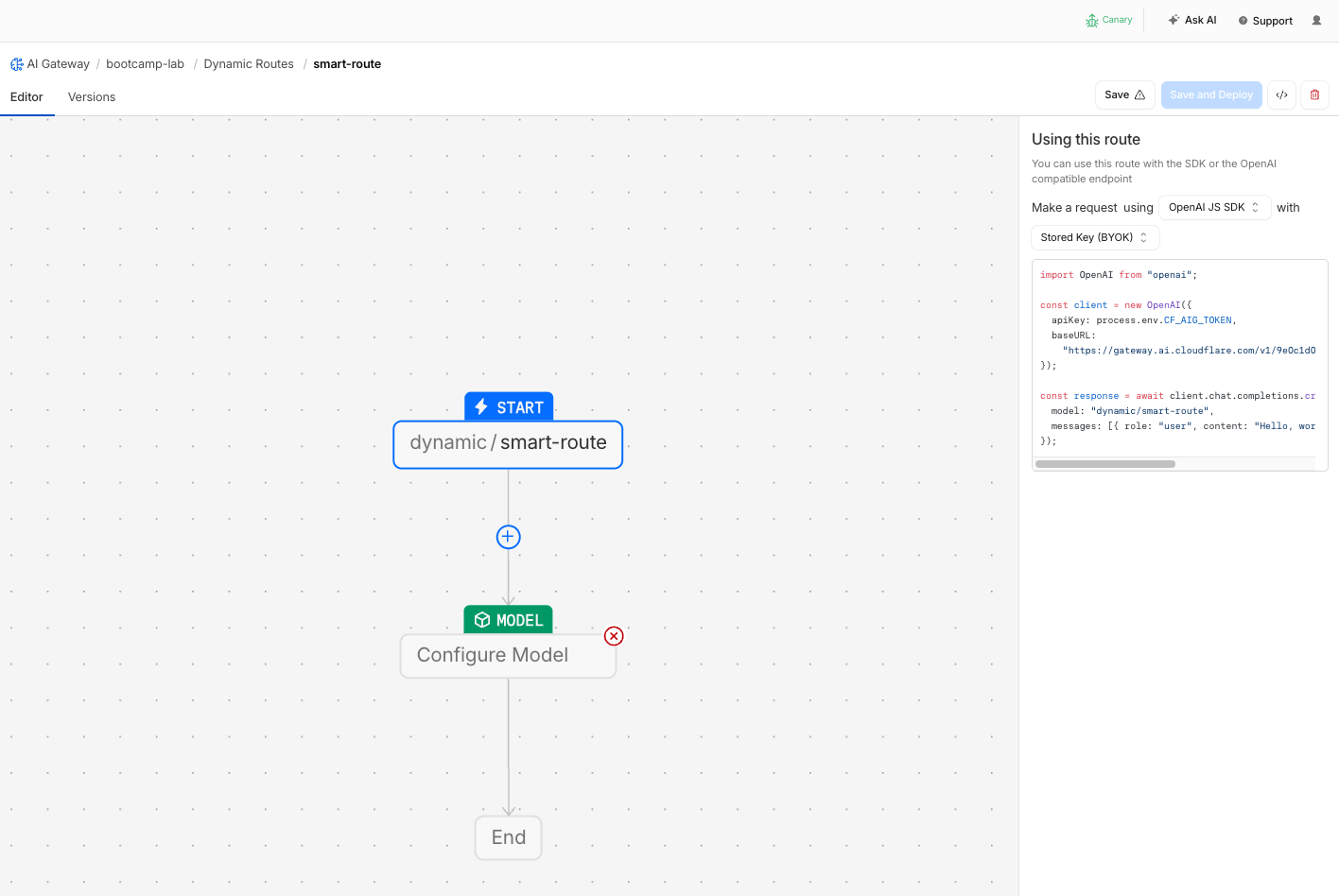
Step 3: Configure Conditional Routing by User ID
Build the first routing pattern: route user-admin to the large model, everyone else to the small model.
- In the flow builder, add a Conditional node
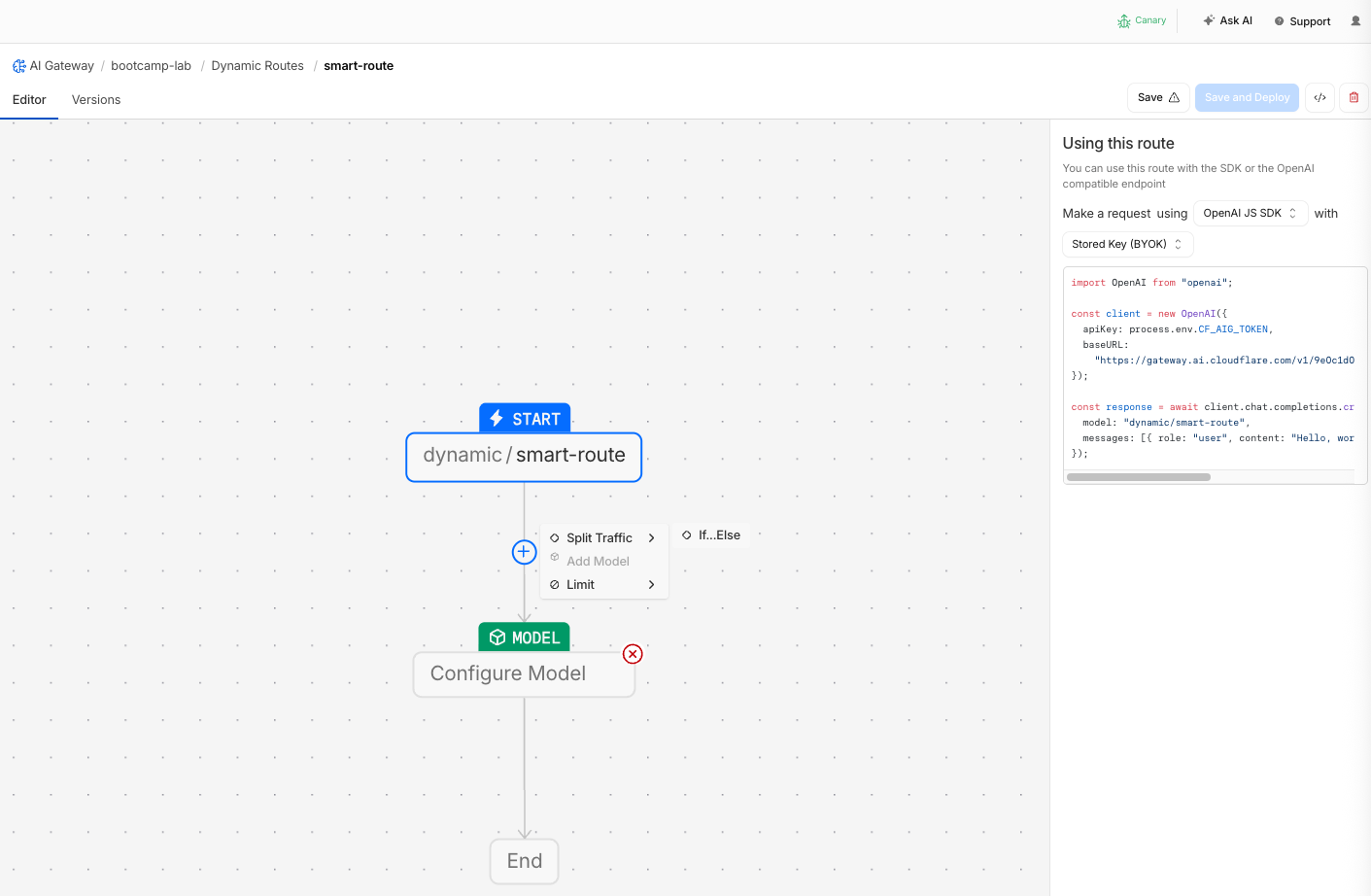
- Configure the condition:
| Field | Value |
|---|---|
| Condition field | metadata.user_id |
| Operator | equals |
| Value | user-admin |
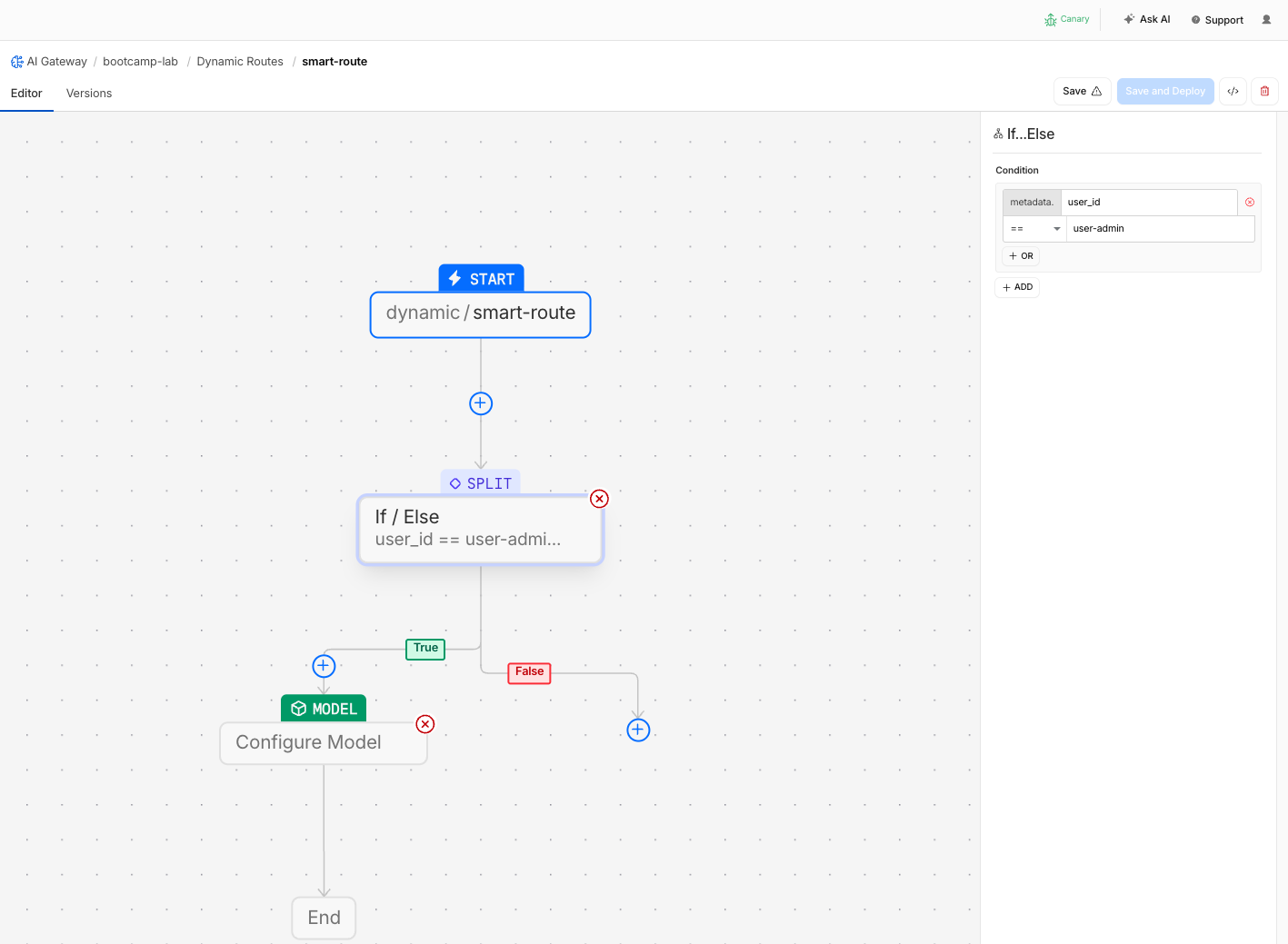
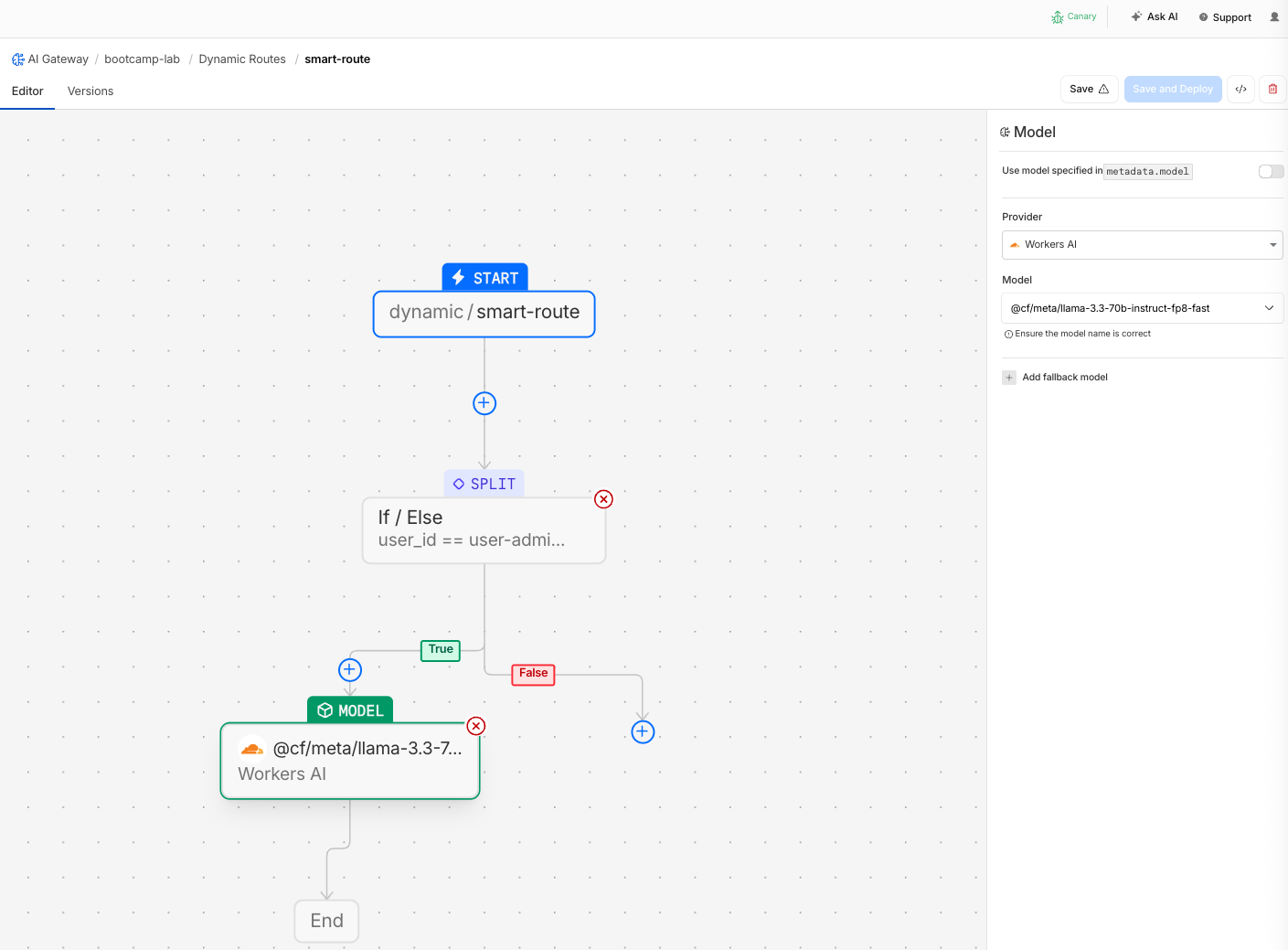
- On the True branch (user-admin), add a Model node:
| Field | Value |
|---|---|
| Provider | Workers AI |
| Model | @cf/meta/llama-3.3-70b-instruct-fp8-fast |
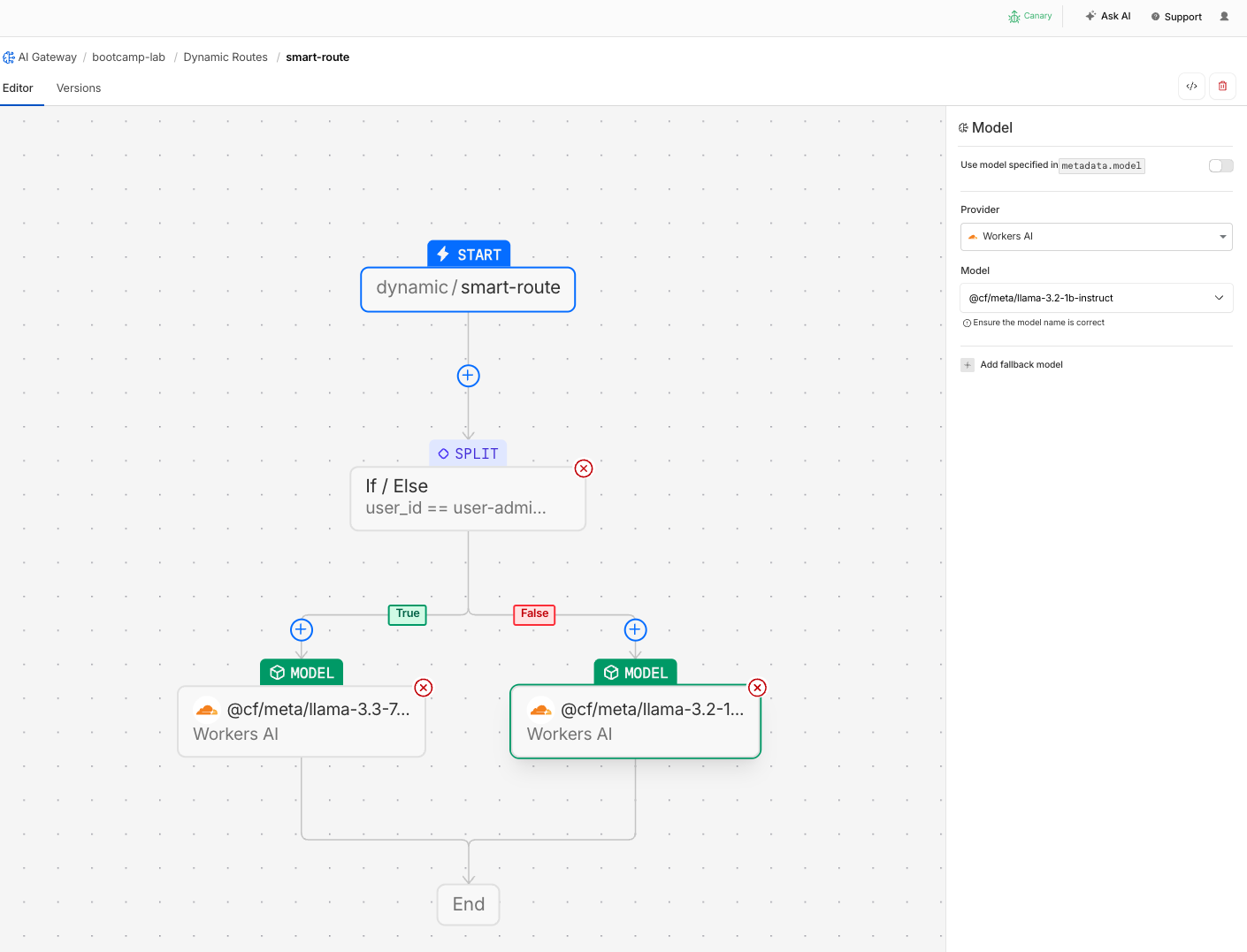
- On the False branch (everyone else), add a Model node:
| Field | Value |
|---|---|
| Provider | Workers AI |
| Model | @cf/meta/llama-3.2-1b-instruct |
- Click Save to deploy the route
Step 4: Test Conditional Routing
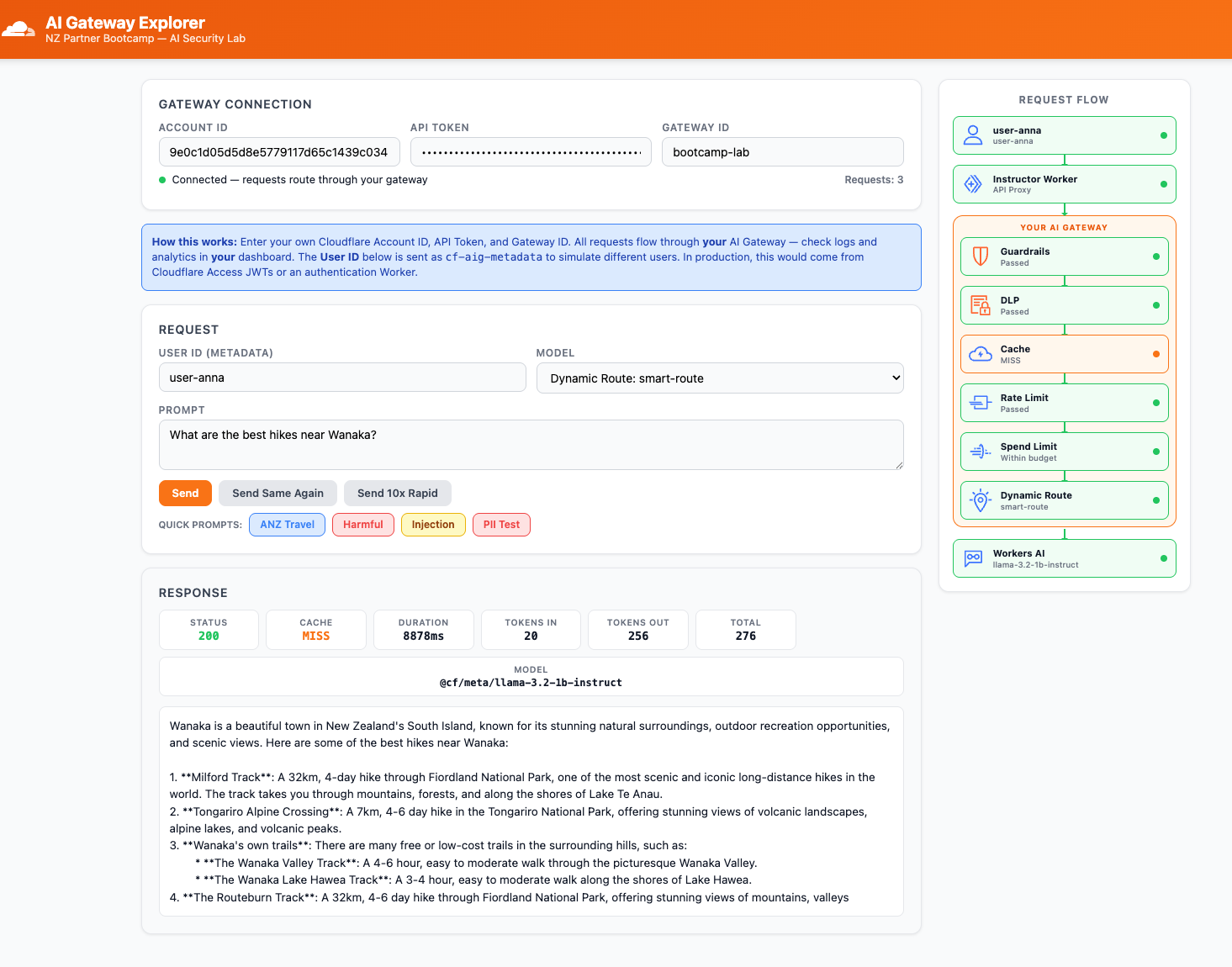
- In the AI Gateway Explorer app, change the Model dropdown to
Dynamic Route: smart-route - Set User ID to
user-anna - Click the NZ Travel quick prompt and click Send
- Check the response — note the Model shown in the response panel
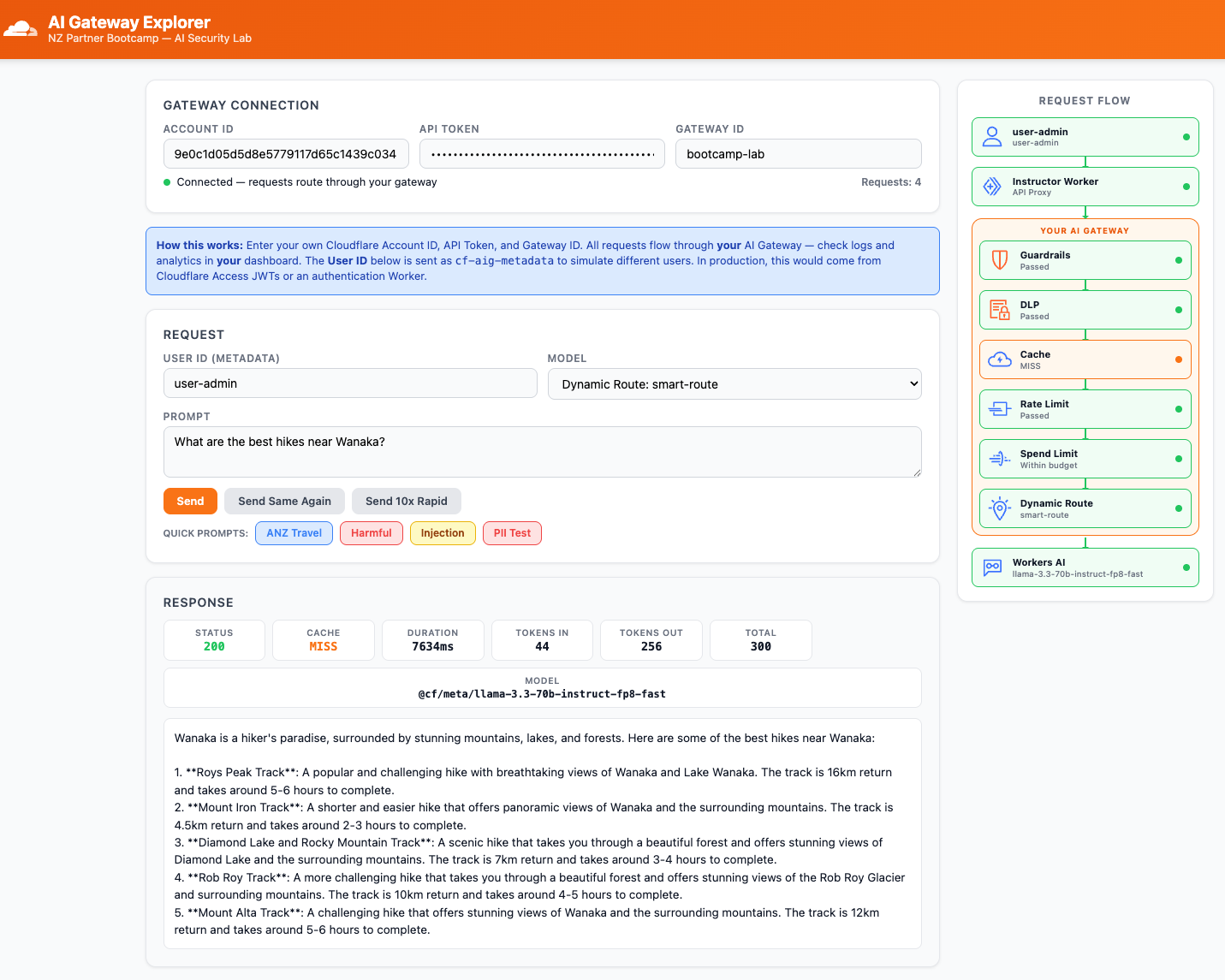
- Now change User ID to
user-admin - Click Send with the same prompt
Expected Result
user-anna→ response served by@cf/meta/llama-3.2-1b-instruct(small model)user-admin→ response served by@cf/meta/llama-3.3-70b-instruct-fp8-fast(large model)
Step 5: Verify Model Selection in Logs
- Navigate to AI > AI Gateway > bootcamp-lab > Logs
- Find the two recent requests
| Request | User ID | Model | Cost |
|---|---|---|---|
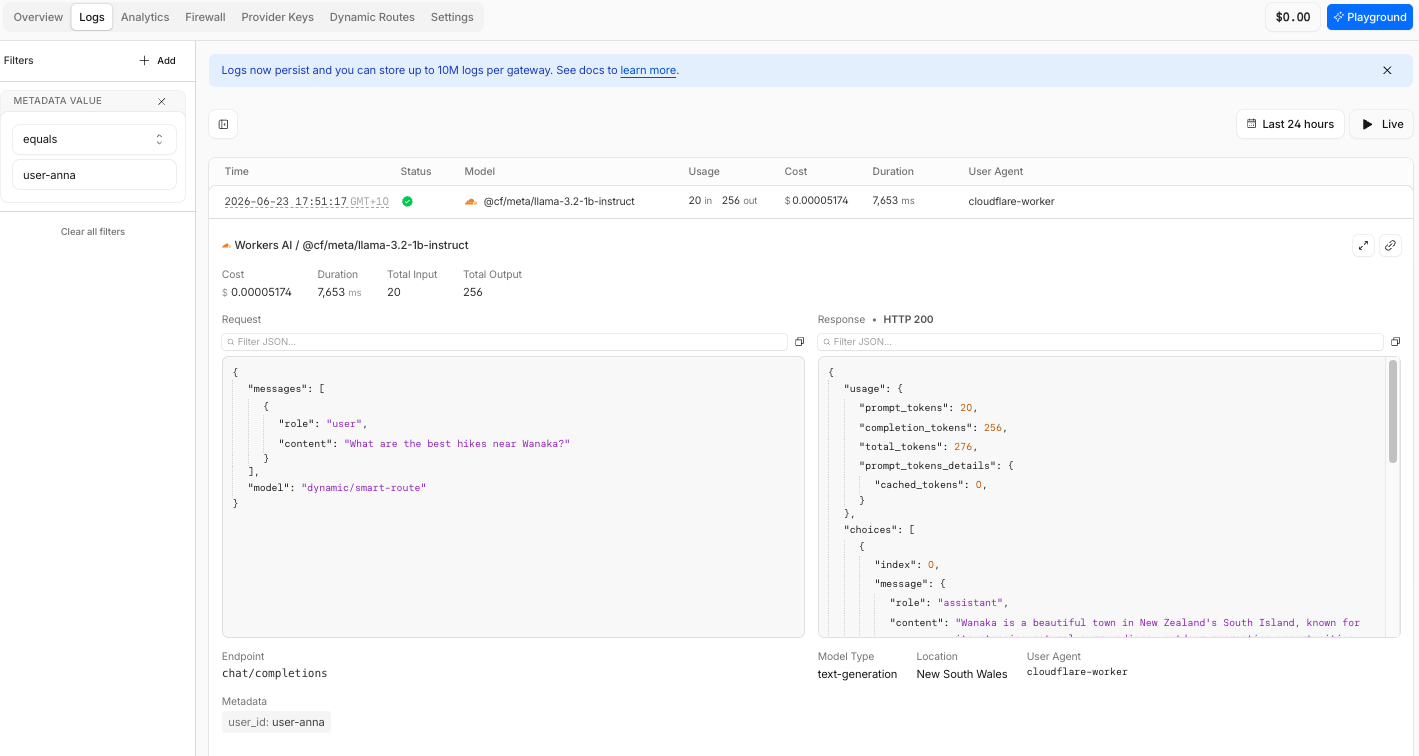
| First | user-anna | @cf/meta/llama-3.2-1b-instruct | Lower |
| Second | user-admin | @cf/meta/llama-3.3-70b-instruct-fp8-fast | Higher |
Same gateway, same route, same prompt — different users get different models. The routing decision is visible in every log entry. The cost difference between the 3B and 70B model is also visible.
user-anna
user-admin
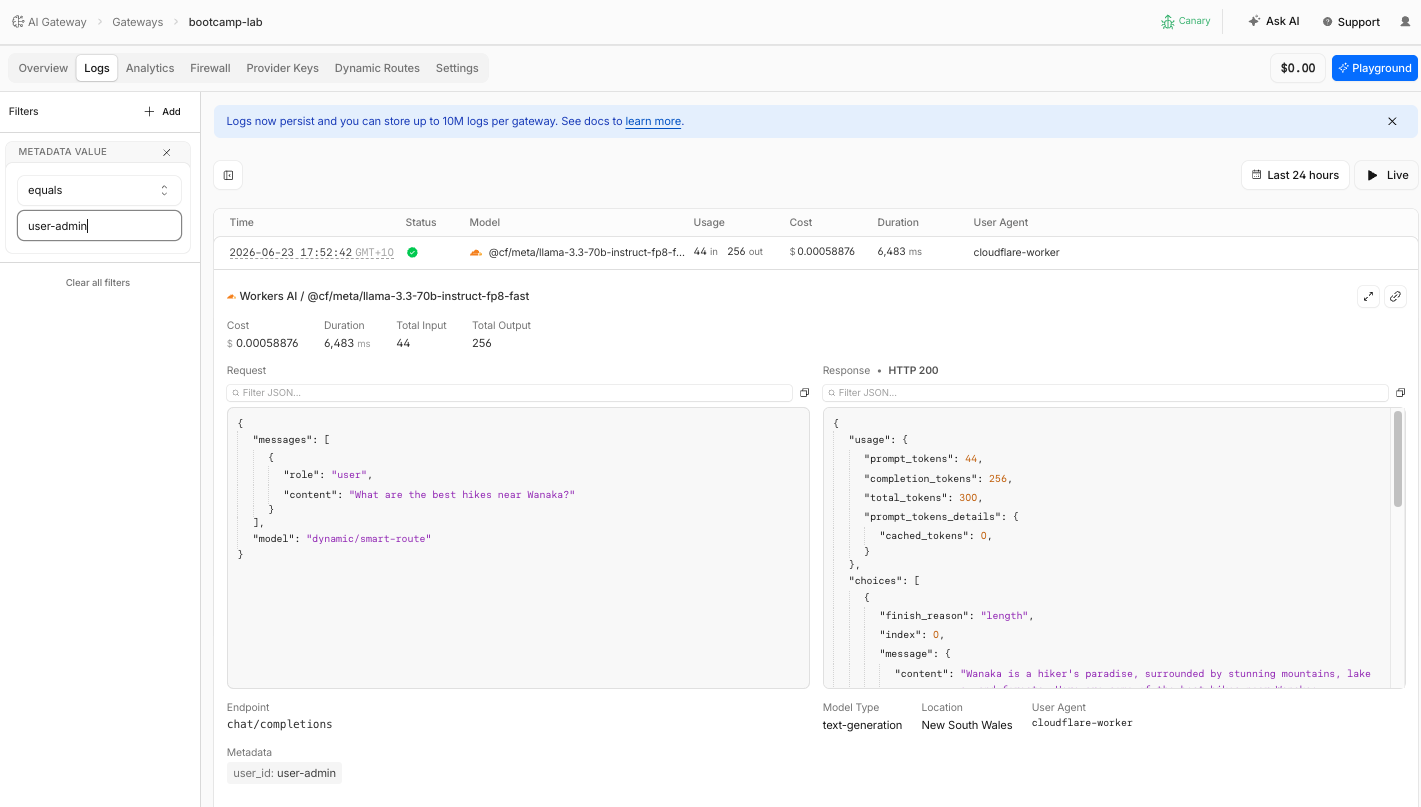
Same gateway, same route, same prompt — different users get different models. The routing decision is visible in every log entry. The cost difference between the 1B and 70B model is also visible.
Step 6: Add Budget-Aware Fallback
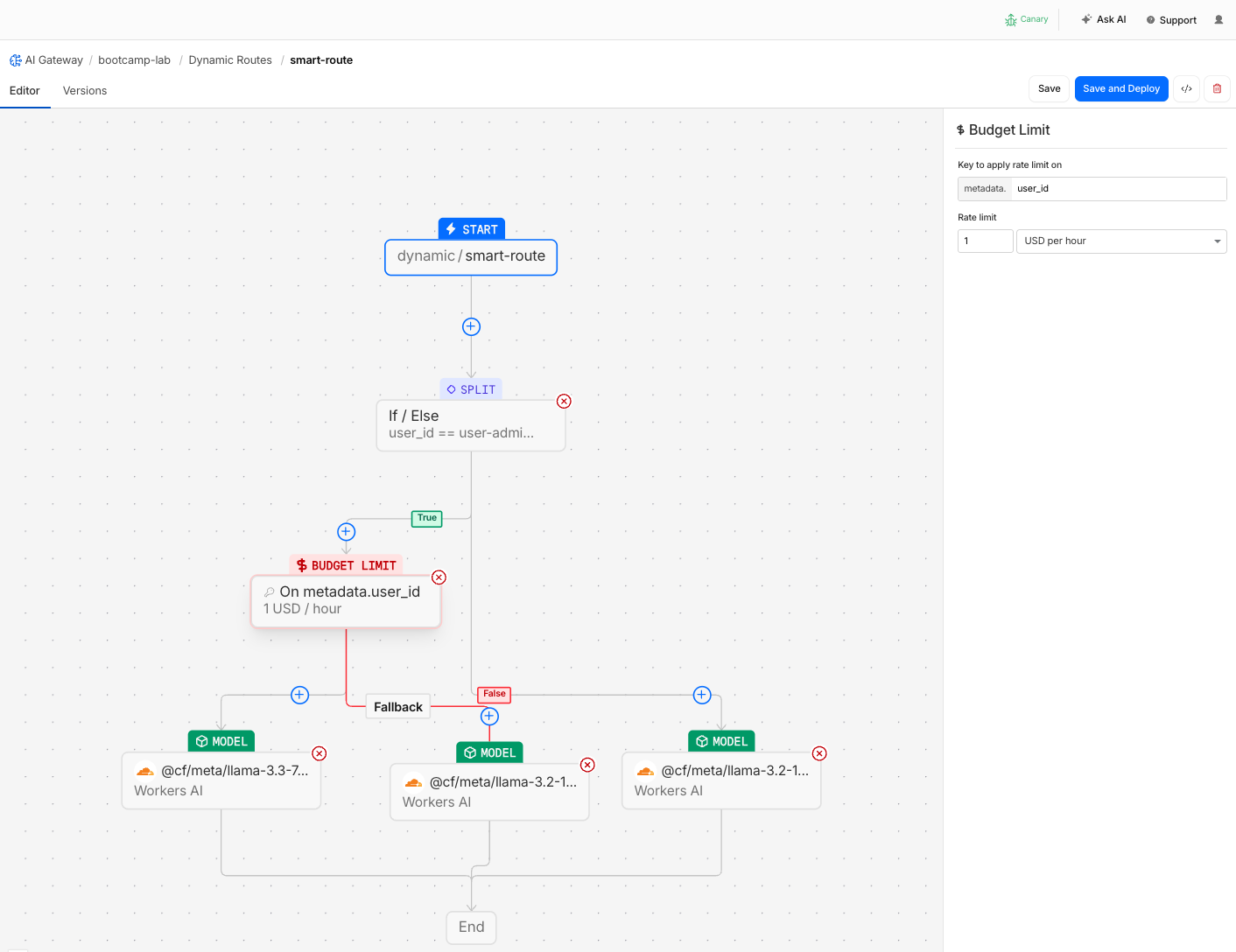
Now add a cost cap to the admin's premium model. When the budget is exceeded, traffic falls back to the cheaper model automatically — no errors.
- Go back to Dynamic Routes > smart-route > Edit
- On the True branch (user-admin), insert a Budget Limit node before the 70B model node:
| Field | Value |
|---|---|
| Budget | $1 |
| Window | 1 hour |
| Key | metadata.user_id |
- Configure the fallback: when budget is exceeded → route to a Model node with
@cf/meta/llama-3.2-1b-instruct
- Click Save & Deploy
The admin branch now looks like:
user-admin → Budget Limit ($1/hr)
                ├── within budget → 70B model
                └── exceeded ────→ 1B model (fallback)
Custom Cost Override
Before testing the budget fallback, you need to understand the Custom Cost feature and why we use it in this lab.
What is cf-aig-custom-cost?
AI Gateway allows you to override the default per-token pricing on any request using the cf-aig-custom-cost header. This sets custom per_token_in and per_token_out values that AI Gateway uses for cost tracking, spend limits, and budget calculations — instead of the model's actual pricing.
Real-world use cases
| Use Case | How Custom Cost Helps |
|---|---|
| Negotiated enterprise pricing | Your organisation has a discounted rate with a provider. Override the default pricing so gateway analytics and spend limits reflect your actual costs, not list prices. |
| Internal chargeback | Different teams are charged different rates. Attach custom cost per team so each team's budget tracks their internal rate. |
| Cost modelling | Simulate what would happen to your spend limits if token prices changed. Override costs to model price increases without waiting for actual pricing updates. |
| Fine-tuned model pricing | You are running a fine-tuned model variant with different economics. Custom cost lets you track the true cost even though the gateway does not know your model's pricing. |
Why we use it in this lab
Workers AI pricing is very low — Llama 3.2 3B costs $0.051 per million input tokens and $0.34 per million output tokens. A typical request costs less than $0.0001. To reach even a $1 budget limit, you would need to send thousands of requests.
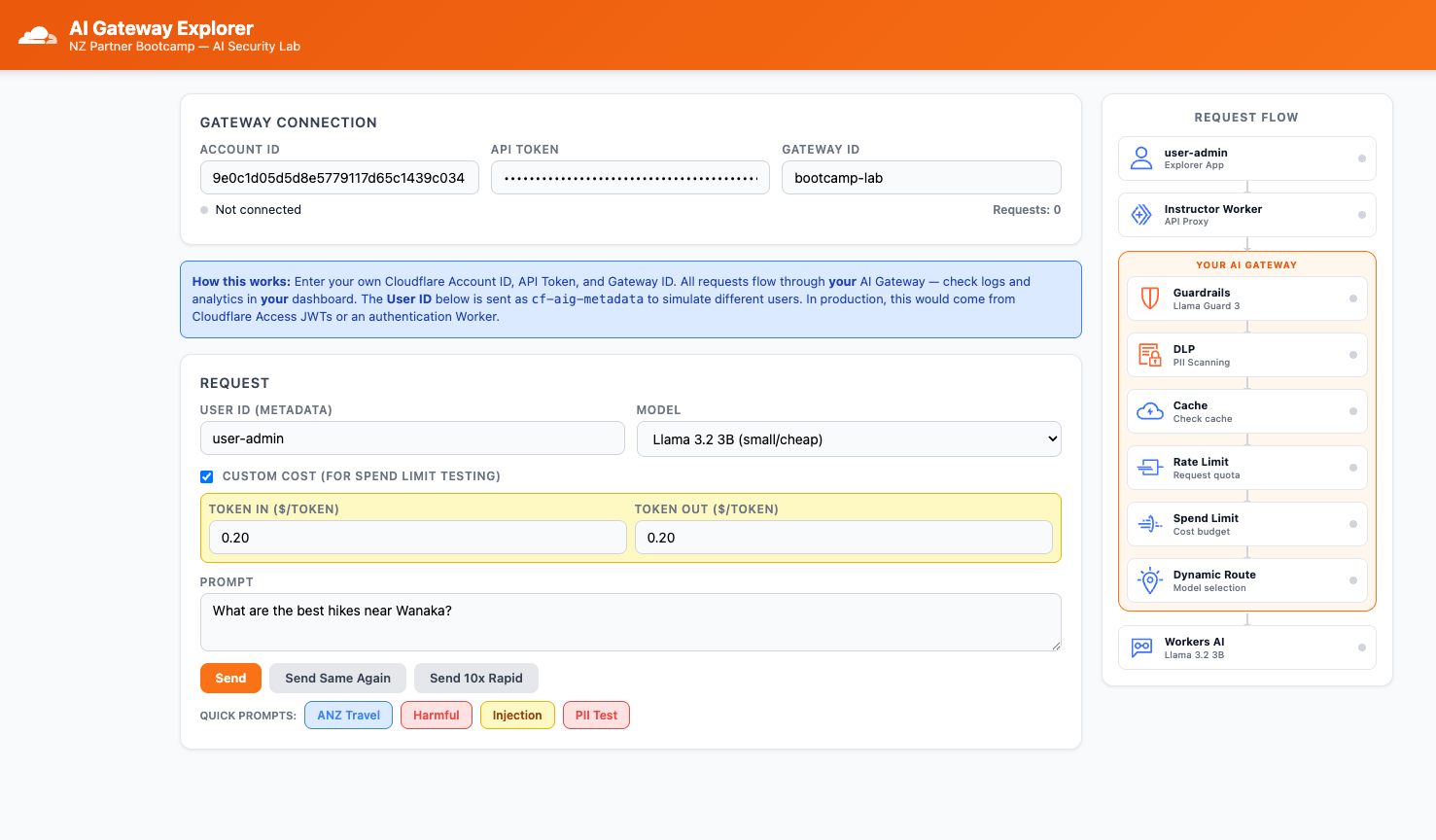
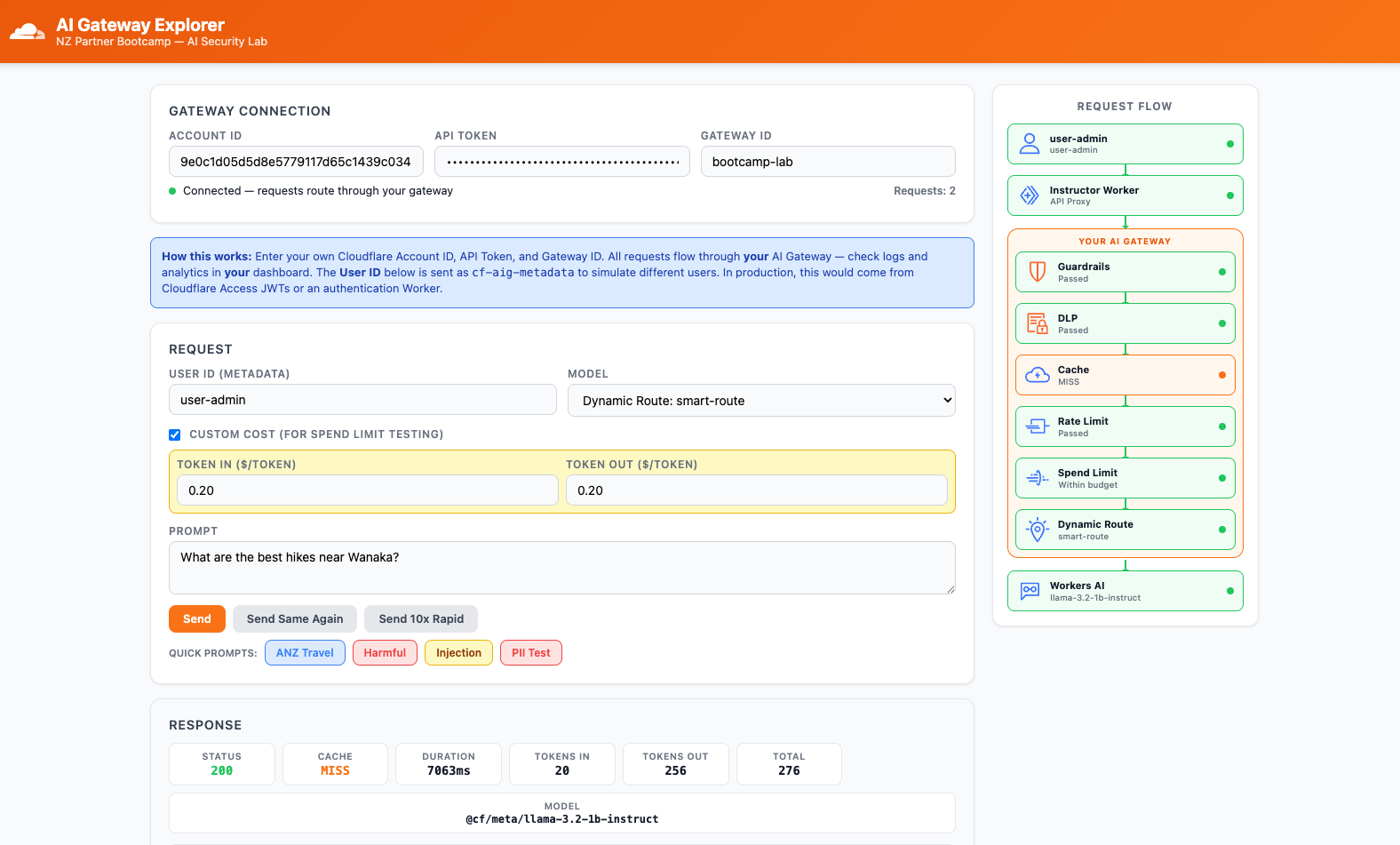
To test budget enforcement quickly, we use the Custom Cost toggle in the Explorer app. At $0.20 per token, a single request "costs" approximately $50 in the gateway's accounting — instantly triggering any budget limit.
Custom costs appear underlined in the gateway logs to distinguish them from actual model pricing.
Remember to disable the Custom Cost toggle after testing budget features. Leaving it enabled will cause all subsequent requests to report inflated costs in your gateway analytics.
Step 7: Test Budget Fallback
- In the Explorer app, enable the Custom Cost toggle and set both Token In and Token Out to
$0.20 - Set User ID to
user-adminand Model toDynamic Route: smart-route
- Send a prompt — the inflated custom cost will burn through the budget in 1–2 requests
- Send a second prompt and watch the Model field in the Explorer response panel
Expected Result
- Early requests: served by
@cf/meta/llama-3.3-70b-instruct-fp8-fast(70B) - After budget depleted: served by
@cf/meta/llama-3.2-1b-instruct(1B) - No errors — the user still gets a response, just from a smaller model
Step 8: Verify Budget Fallback in Logs
- Go to Logs and filter by
metadata.user_id = user-adminor scroll through recent requests
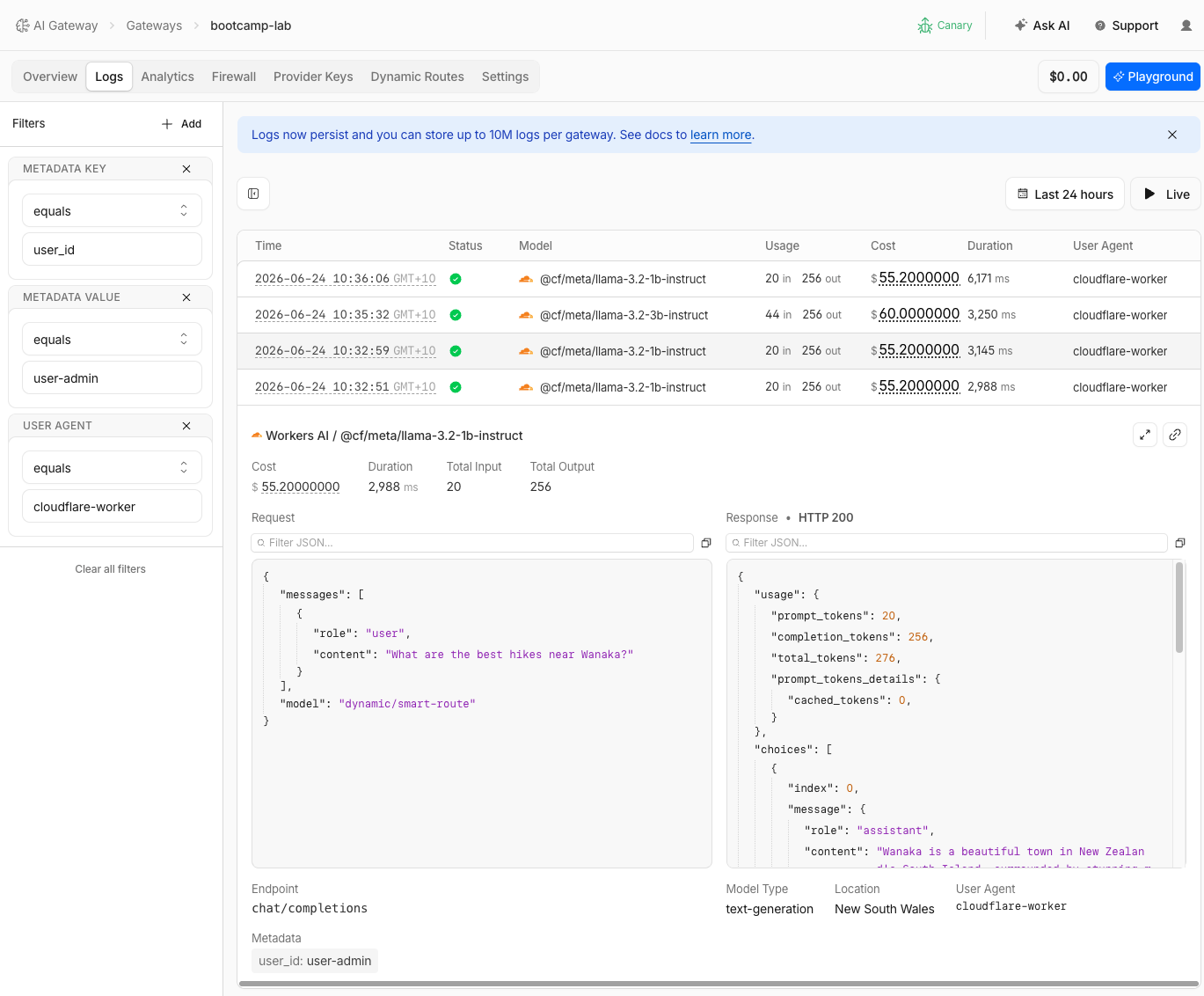
| Early requests | Later requests |
|---|---|
Model: llama-3.3-70b-instruct-fp8-fast | Model: llama-3.2-1b-instruct |
| Higher cost per request | Lower cost per request |
| Status: Success | Status: Success |
This is the critical difference:
- Spend limits (Page 4) → hard block → returns
429 Too Many Requests→ user sees an error - Budget-aware dynamic routing → soft redirect → cheaper model → user still gets a response
Spend limits protect your wallet. Dynamic routing protects the user experience.
Step 9: Review the Complete Route
- Go to Dynamic Routes > smart-route
- Review the complete visual flow:
The route flow you built:
                    ┌──────────────┐
                    │  Conditional  │
                    │  user_id ==   │
                    │ "user-admin"  │
                    └──────┬───────┘
                     yes   │   no
              ┌────────────┤────────────┐
              ▼                         ▼
     ┌────────────────┐        ┌──────────────┐
     │  Budget Limit   │        │    Model      │
     │  $1 / 1hr    │        │  Llama 3.2 3B │
     └───────┬────────┘        └──────────────┘
       ok    │  exceeded
       ▼     ▼
  ┌────────┐ ┌────────┐
  │  70B   │ │   3B   │
  │ model  │ │fallback│
  └────────┘ └────────┘
Dynamic routes are versioned. Each time you save changes, a new version is created. You can instantly roll back to a previous version if something goes wrong — no code deploys needed.
A/B Testing with Percentage Routing
This section is knowledge only. Percentage-based routing is currently available via the API (BETA) and is not yet configurable in the dashboard visual flow builder. The goal is to understand the capability so you can position it in customer conversations.
What is percentage routing?
A Percentage node in a dynamic route splits traffic probabilistically across multiple model branches. This enables:
- Gradual model rollout — send 10% of traffic to a new model, monitor quality, then increase to 50%, then 100%
- A/B testing — compare two models side-by-side on real production traffic
- Canary deployments — test a model update on a small percentage before full rollout
How it works
A Percentage node defines two or more output branches, each with a traffic percentage that sums to 100%. For each request, the gateway randomly selects a branch based on the configured weights.
Example: 50/50 split between two models
| Branch | Percentage | Model |
|---|---|---|
| Branch A | 50% | @cf/meta/llama-3.2-3b-instruct |
| Branch B | 50% | @cf/deepseek-ai/deepseek-r1-distill-qwen-32b |
In the gateway logs, you would see roughly half the requests served by each model — useful for comparing response quality, latency, and cost between models on real traffic.
API configuration example
Percentage routing can be configured via the AI Gateway API by defining a route with a percentage node. Here is an illustrative example of how the default (non-admin) branch in your smart-route could be extended with a 50/50 split:
{
  "nodes": [
    {
      "type": "conditional",
      "condition": "metadata.user_id == 'user-admin'",
      "true_branch": "budget_node",
      "false_branch": "percentage_node"
    },
    {
      "id": "percentage_node",
      "type": "percentage",
      "branches": [
        { "weight": 50, "next": "model_3b" },
        { "weight": 50, "next": "model_deepseek" }
      ]
    },
    {
      "id": "model_3b",
      "type": "model",
      "model": "@cf/meta/llama-3.2-3b-instruct"
    },
    {
      "id": "model_deepseek",
      "type": "model",
      "model": "@cf/deepseek-ai/deepseek-r1-distill-qwen-32b"
    }
  ]
}
The JSON structure above is illustrative. Refer to the Dynamic Routing documentation for the exact API schema. When percentage routing is available in the dashboard visual builder, you will be able to configure it the same way you configured the conditional and budget nodes in this lab.
Customer Talk Track
"What happens when your primary AI model is over budget, or you want to test a new model without risking all your traffic? AI Gateway dynamic routing lets you build conditional logic, budget-aware fallbacks, and A/B test splits via the API — all without code changes. Versioned rollback and every routing decision is logged. You can give premium users a premium model and automatically degrade gracefully when budgets are hit.
And for transient failures — timeouts, provider outages — AI Gateway automatically retries requests with configurable backoff, before the user ever sees an error. Retries plus dynamic routing plus caching gives you a full resilience stack for AI inference."
Beyond Dynamic Routing: Automatic Retries
This section is knowledge only — there are no steps to configure. The goal is to understand the full resilience capabilities AI Gateway provides beyond dynamic routing, so you can position them in customer conversations and PoC scoping.
Dynamic routing handles persistent failures — model over budget, provider unavailable, cost-driven fallback. But what about transient failures — a brief timeout, a 503 from an overloaded provider, a momentary network glitch?
AI Gateway supports automatic retries at the gateway level. When an upstream provider returns an error, the gateway retries the request based on the retry policy you configure — without any client-side changes.
Retry Configuration
You can configure retries in the gateway Settings or override per-request using headers:
| Setting | Dashboard Path | Per-Request Header | Range |
|---|---|---|---|
| Retry count | Settings > Retry Requests | cf-aig-max-attempts | 1–5 attempts |
| Retry delay | Settings > Retry Requests | cf-aig-retry-delay | 100–5000 ms |
| Backoff strategy | Settings > Retry Requests | cf-aig-backoff | constant, linear, exponential |
| Request timeout | Settings > Retry Requests | cf-aig-request-timeout | milliseconds |
Backoff strategies explained:
- Constant — same delay between each retry (e.g., 500ms, 500ms, 500ms)
- Linear — delay increases by the base amount each attempt (e.g., 500ms, 1000ms, 1500ms)
- Exponential — delay doubles each attempt (e.g., 500ms, 1000ms, 2000ms) — best for overloaded providers
On the final retry attempt, the gateway waits for the request to complete regardless of how long it takes.
How Retries and Dynamic Routing Work Together
Retries and dynamic routing solve different problems and complement each other:
| Capability | Handles | Example |
|---|---|---|
| Automatic retries | Transient failures — timeouts, 503s, brief provider issues | Provider has a momentary spike; retry succeeds on second attempt |
| Dynamic routing | Persistent failures — model over budget, provider down, cost-driven fallback | Primary model budget exceeded; route to cheaper fallback model |
| Caching | Repeat queries — same prompt served from cache | Identical question asked again; served instantly at $0 cost |
AI Gateway provides three layers of resilience for AI inference:
- Automatic retries — retry transient failures (timeouts, 503s) with configurable backoff, no client changes needed
- Dynamic routing — fail over to a different model or provider when the primary is unavailable or over budget
- Caching — serve cached responses when the model is completely unavailable, or for repeat queries at $0 cost
Together, these ensure your AI application stays responsive even when upstream providers have issues. All three are configured at the gateway level — no application code changes required.
Validation
- Dynamic route
smart-routecreated -
user-annarouted to the small model -
user-adminrouted to the large model - Model selection differences visible in gateway logs
- Budget fallback configured ($1/hr for admin)
- After budget depletion,
user-adminautomatically falls back to the small model with no errors - Budget fallback transition visible in logs (70B → 3B)
- Complete route flow visible in the visual builder
- Understand how A/B percentage routing works (knowledge section)
Troubleshooting
Dynamic route not routing to the correct model
- Verify the Model dropdown in the Explorer app is set to
Dynamic Route: smart-route - Check that the conditional node uses
metadata.user_id(notuser_id) - Ensure the User ID in the Explorer app matches exactly (e.g.,
user-adminnotadmin) - Review the route in the visual builder to confirm the flow logic
Budget fallback not triggering
- The $0.01 budget may not be exhausted yet — send more requests
- Budget tracking is eventually consistent — a burst of concurrent requests may briefly exceed the limit
- Check that the Budget Limit node's Key field is set to
metadata.user_id - Verify the fallback branch connects to the correct 3B model node
"Model not found" error with dynamic route
- The model name in the Explorer app must be
dynamic/smart-route(not justsmart-route) - Verify the route name in the dashboard matches exactly
- Check that the route has been saved (not still in draft)